Company
About MainConcept
In our previous post, we introduced Constant Target Quality (CTQ) encoding, a new rate control mode in the MainConcept HEVC/H.265 Video Encoder, which allows you to specify a target VMAF quality level and have the encoder automatically hit the target in a single pass. We explained why achieving consistent perceptual quality across a large video library with diverse content is difficult with traditional CRF encoding and how our VMAF-E proxy metric, together with a PID-style control loop inside the encoder, solves this problem at live-encoding speeds.
Since then, we have further optimized CTQ:
In this post, we will highlight the most important use case in which CTQ pays off: segment-based Video-on-Demand (VOD) encoding with AVC/H.264. We will also highlight how to use the vScore logging feature to measure per-frame quality directly from the encoder and share results of large-scale Dask experiments comparing CTQ with CRF for a full-length broadcast sequence.
For more information, check out:
For distribution via HLS or DASH (with CMAF), the encoded bitstream is chopped into short segments of typically 2-4 seconds, so that an adaptive bitrate (ABR) player can switch between renditions of different resolutions and bitrates at segment boundaries. This means that every segment must start with an IDR/IRAP frame for it to be independently decodable. A modern transcoding workflow, whether on-premises or in the cloud, can use this property and, therefore, encode all segments in parallel for maximum throughput.
Combining segmented encoding with content adaptivity means that every segment should be encoded at exactly the right bitrate to meet a desired quality level while also considering other constraints, such as maximum and minimum average bitrate. This is a complex challenge, solved by existing solutions, either through brute force or iterative approaches—encoding every segment repeatedly until optimal parameters have been found—or through smart pre-analysis.
CTQ works differently. Since perceptual quality is measured for every frame during encoding and this information is constantly fed back into the rate control to hit the desired average quality, there is no need for repeated encoding. Given long enough segments, which is the case for typical ABR scenarios, CTQ will also be able to hit the desired target quality for every individual segment. For good rate-distortion performance, a certain level of quality variation within each segment is desirable and typically not noticeable for human viewers. For very specific use cases that demand even tighter perceptual quality control on every frame, we provide the option to re-encode dedicated frames.
CTQ encoding respects all of the usual VOD constraints: IDR positions can be pinned to segment boundaries, I-frames can be inserted at scene changes and the bitrate can be capped via HRD/CPB conformance.
Let’s look at a basic CTQ encoding example in Python using a segmented VOD asset. The code below is a stripped-down version of the experiment we are running internally on our Kubernetes cluster via Dask. The cluster setup, MongoDB result storage and other internals have been stripped out so we can see the raw encoding logic. The AVC/H.264 encoder referenced here is plugged directly into FFmpeg.
The actual configuration for CTQ is straighforward: target_quality = 90.0 sets the desired average VMAF-E quality and, optionally, max_quality_threshold = 12.0 sets a threshold that determines when frames should be re-encoded. If the measured per-frame quality deviation from the target quality is above or lower than the threshold, frames will be re-encoded with a modified QP until the quality is within acceptance range. However, even with re-encodings, due to rate-distortion efficiency constraints, it cannot be guaranteed that the desired quality will be met every time. We try to prevent excessive bitrate spending on individual frames.
To validate CTQ for AVC/H.264 under production-grade VOD conditions, we selected a real-world ~50-minute broadcast asset, encoded as a 50Mbit/s XDCAM-HD source as our test sequence. The source had to be deinterlaced on the fly via FFmpeg before being fed into the MainConcept AVC/H.264 Video Encoder. This test sequence was very typical for TV content with a mix of static and dynamic scenes, varying complexity, graphics overlays, hard cuts and end credits.
To gain a better understanding of the performance of CTQ, we compared it with the CRF mode of the encoder, which is optimized for RD efficiency. We set up a Dask cluster with 80 workers and encoded the source material with the following two configurations:
Both modes used an identical GOP structure (4 second IDR interval), identical encoder presets and VMAF-E measured while encoding. Additionally, we also recorded the actual VMAF scores by specifying quality_metric = 12, which would have been prohibitively expensive to accomplish in an actual production deployment, due to the large computational overhead of VMAF on CPUs. For each encoded chunk, we therefore retrieved the per-frame VMAF-E and VMAF measurements so we could cross-check both. In a production deployment, only measuring VMAF-E at encoding time by specifying quality_metric = 8 would be the lightweight approach.
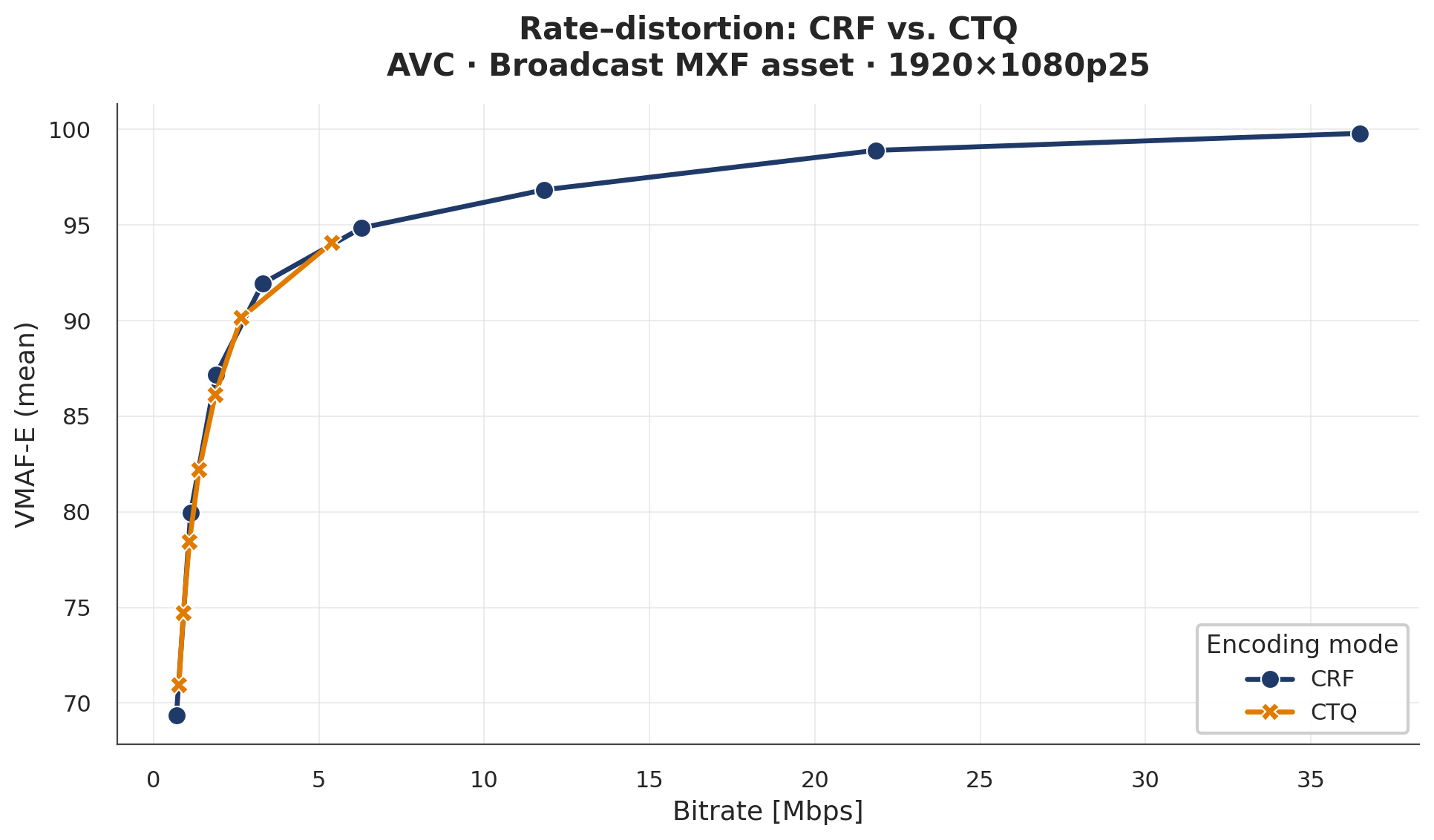
Figure 1 – Rate-distortion efficiency
Figure 1 shows the rate distortion plot for the test sequence in terms of average bitrate and video quality measured as VMAF-E scores. Across the relevant quality range from 85-95, the CTQ curve sits on top of the CRF curve, indicating that, for this particular asset, CTQ achieves identical compression efficiency. Notably, the CRF-mode rate-distortion curve is very flat for VMAF-E values above 96. This means that choosing a CRF that is too low can easily result in overspending bitrate.
Figure 1 does not tell us the whole underlying story. In fact, just looking at the average quality tells us nothing about how quality varies across the entire asset. The real benefit of CTQ is not visible in the average RD-curve. Figure 2 provides us this insight, as it shows the average VMAF-E quality (top) and corresponding actual VMAF quality (bottom) per 4.0s segment over the whole ~50-min asset for CTQ target_quality = 90 compared to fixed CRF rate_factor = 32.
The differences are clear: Fixed CRF (blue) VMAF-E quality (top plot) can vary significantly and noticeable outliers can occur. However, CTQ (orange)maintains near-constant VMAF-E quality across all segments, with minor deviations where the content is of very high complexity. When looking at the actual VMAF scores, a similar conclusion can be made. Although the quality measured across segments is noisier, the deviation in average quality is within +- 3.0 VMAF scores for most parts of the sequence.
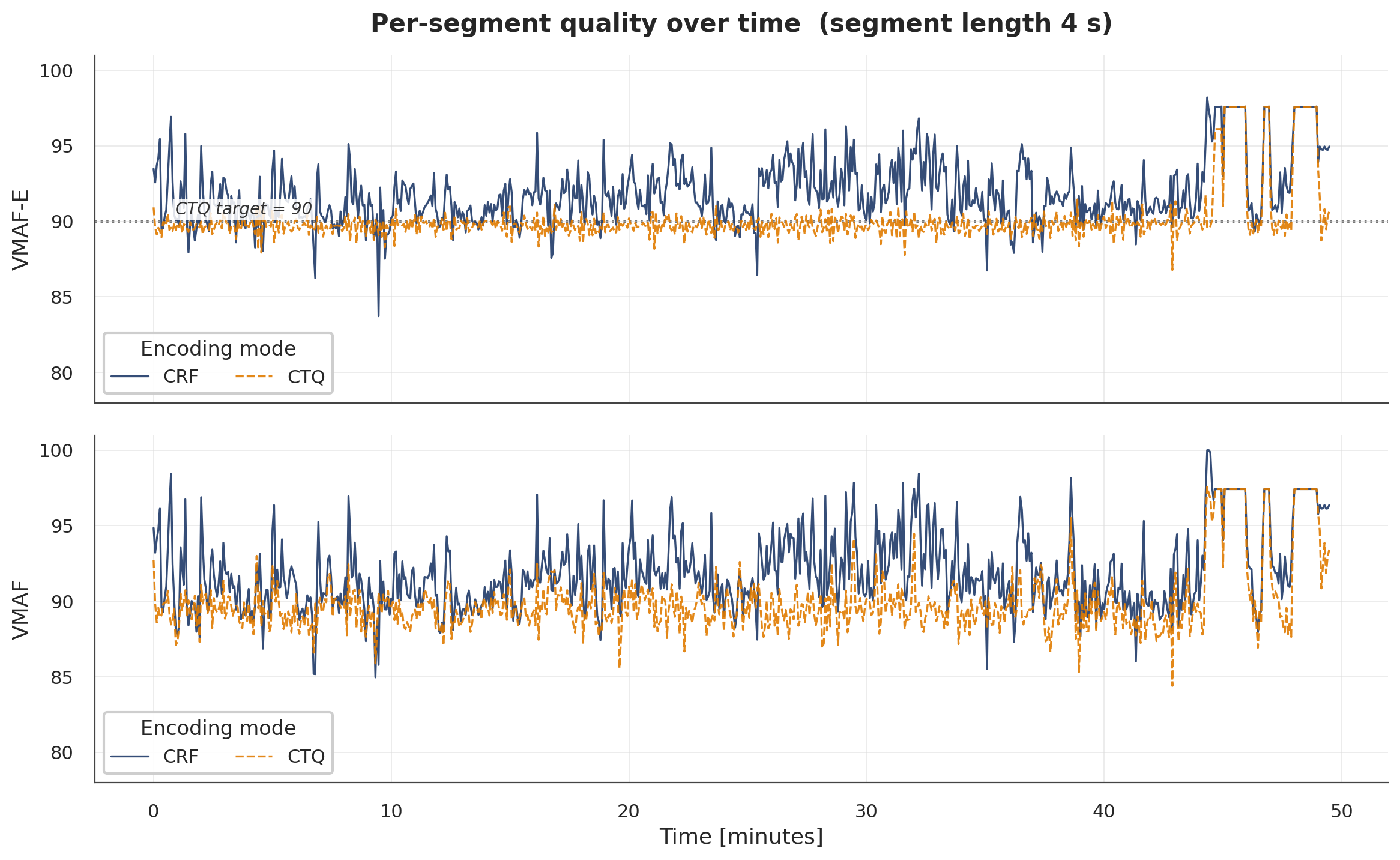
Figure 2 – Per-segment quality
For ABR use cases, this is exactly the desired property. The top rendition of your ladder is the most important one and, therefore, supposed to have excellent, uniform visual quality. CTQ delivers this by design.
Since CTQ steers the bitrate based on VMAF-E—our fast VMAF proxy—a natural question is how close VMAF-E is compared to true VMAF, as reported by end-user quality measurement tools.
Figure 3 answers this directly. For every frame, we compute the VMAF-E error as vmaf_e_error = vmaf_e – vmaf and plot the resulting histogram. The mean absolute error is about 1.67 across all 74250 frames with the error distribution centered near zero. In other words, our CTQ encoding with a VMAF-E target quality of 90 will, on average, agree with an independent VMAF measurement by less that 2 VMAF scores, well inside the 2-6 score just-noticeable-difference (JND) range that is suggested.
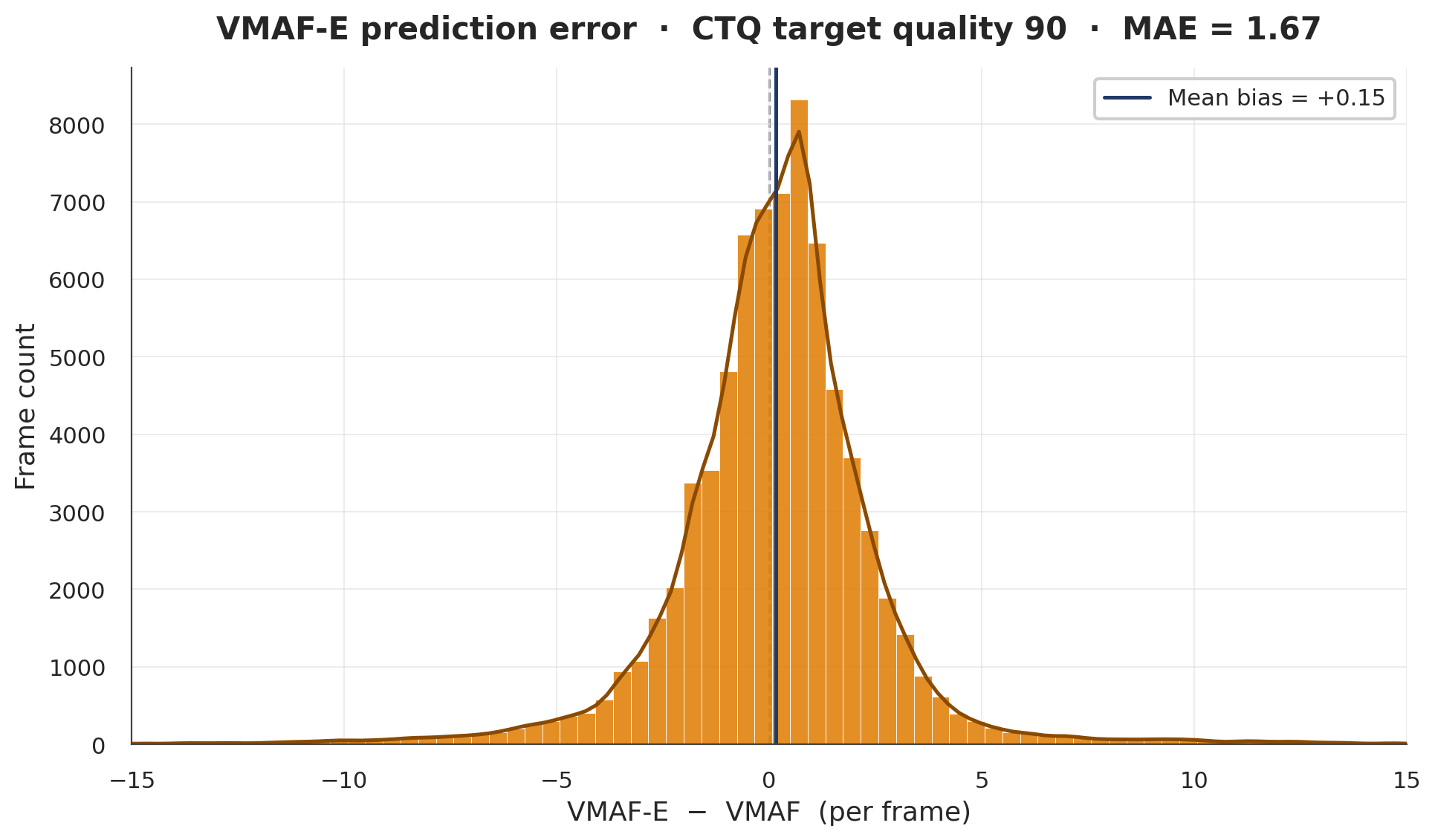
Figure 3 – Validating VMAF-E accuracy
To summarize, for a segment-based VOD pipeline, encoding the top-rung rendition of an ABR ladder, the workflow with CTQ is now very short:
This approach requires no trial encodings, no per-title search, no content-classification or multiple-encoding passes. The encoder measures quality frame by frame and steers towards the target in a single pass. These properties are crucial, when the encoding scenario requires a large number of encodings daily and computational resources become a bottleneck for multi-pass encoding. The exact same recipe can also be used for our MainConcept HEVC/H.265Video Encoder.
With MainConcept Codec SDK 16.2, CTQ is now available for AVC/H.264 with improved algorithmic performance. Our experiments using a real-word asset demonstrate that CTQ is essentially rate-distortion neutral compared to CRF within the typical VOD bitrate operating range, while delivering consistent perceptual quality with every segment. Per-frame quality logs, including regular VMAF measurements, can be easily captured from our sample encoders and FFmpeg plug-ins to verify the result.